

UPI transaction failed but money debited? Follow 7 proven steps to get refunds — RBI/NPCI timelines, complaint templates, escalation paths and evidence checklist. UPI transaction failed but money debited, UPI failed transaction refund, money debited but transaction failed UPI, UPI refund time RBI, UPI transaction reversal rules, RBI rules for failed UPI transaction, UPI refund not received what to do, how to get UPI refund in India, how long does UPI refund take in India, what to do if UPI payment fails but money deducted, consumer rights digital payments, UPI settlement delay.
Introduction — why this exact problem matters right now
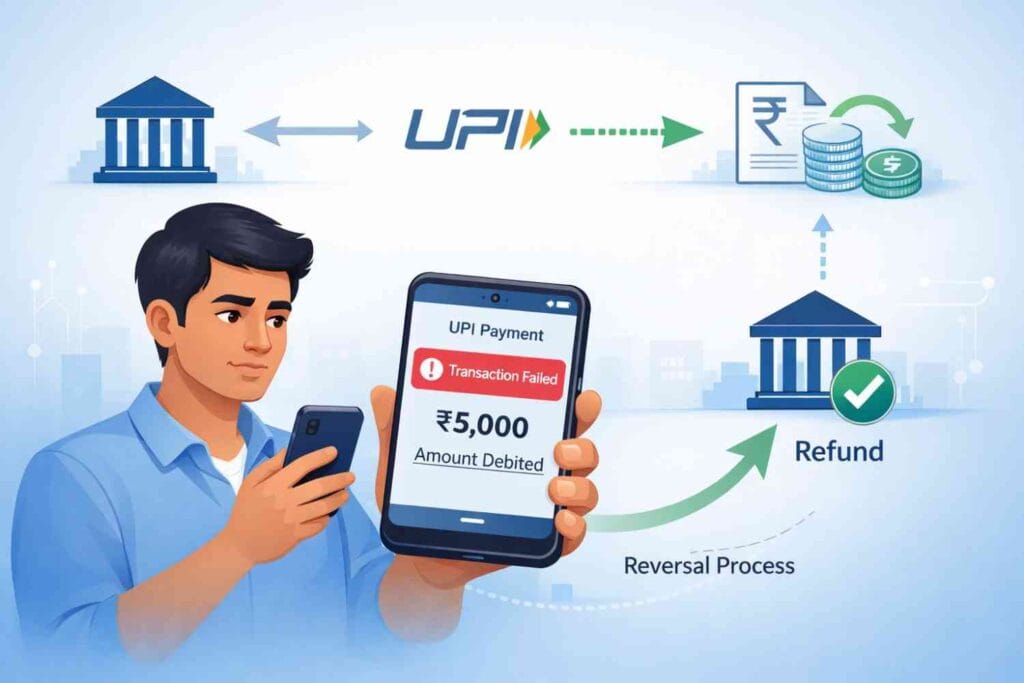
Seeing UPI transaction failed but money debited is stressful: your balance drops, apps say “failed” or “pending,” and you don’t know whether to panic, wait, or escalate. This article explains, in practical detail and with step-by-step templates, what happens inside the UPI rails, the RBI/NPCI timelines that protect you, how reversals are triggered, and the exact escalation ladder to get your money back fast. Read this before retrying any payment.
What “UPI transaction failed but money debited” actually means (technical clarity)
A UPI transfer flows across three principal nodes: the payer bank (your bank), the NPCI UPI switch, and the beneficiary bank / merchant acquirer. When your bank debits the amount but the beneficiary or NPCI does not send back the confirmation acknowledgement (ACK), the UPI app shows “failed” while the debit remains in your bank ledger. Technically the debit has occurred; settlement confirmation has not. In operational terms this is a settlement mismatch — usually fixed by auto-reversal — not theft.
Practical note: if you see UPI transaction failed but money debited, document the UTR and timestamp immediately — that single reference is the fastest route to resolution.
Deep technical & operational reasons (why it happens)
Below are the real causes, not vague guesses — with examples and how they affect reversal behaviour:
- Bank / PSP timeouts (high load): During festival sales or payroll days, banks or PSPs (payment apps) may face high latency. A debit may be logged at the payer bank while the NPCI ACK times out.
- NPCI routing, queuing and settlement timing: NPCI routes and queues messages. If routing is delayed the beneficiary may get the message later or the message may enter reconciliation cycles — producing “failed” at the UI while a debit shows on your account.
- Merchant acquirer acknowledgement failure: Merchant payments have an extra step — the acquirer must confirm receipt. If the acquirer’s batch fails or is flagged for risk checks, the payer may see “failed” even though the payer bank already debited funds.
- Duplicate / out-of-sequence messages: Network reordering or duplicate messages can confuse switches; reconciliation then needs manual traces.
- App / SDK / connectivity glitches: App crashes, dropped connections, or outdated SDKs can interrupt the final ACK.
All of these are operational — recorded in logs and resolved by auto-reversal processes or manual reconciliation between banks, NPCI, and PSPs.
RBI & NPCI rules that protect you (timelines & high-level obligations)
RBI and NPCI set operating norms to ensure users are not left waiting indefinitely.
- Fund transfers: The practical expectation is an auto-reversal by T+1 business day if the beneficiary is not credited; this is the typical regulated SLA used in practice.
- Merchant payments: Because merchant settlements involve acquirers and reconciliation batches, reversals may take up to T+5 working days in exceptional cases.
- No repeated forced complaints: Banks and PSPs should not force consumers to submit multiple low-level complaints for system reversals — the ecosystem must handle auto-reversal when the failure is due to system timing.
Always check RBI and NPCI operational circulars for exact current wordings; the above reflects commonly enforced operating practice and consumer guidance.
How reversals happen behind the scenes (step-by-step)
- Debit recorded at payer bank: Your bank debits your account and sends a debit message to NPCI.
- NPCI routes the message to the beneficiary bank or merchant acquirer.
- No ACK from beneficiary: NPCI flags the transfer as unsettled and triggers an auto-reversal instruction.
- Auto-reversal: Payer bank credits your account (instant or next settlement cycle).
- Reconciliation queues if auto-reversal fails: Manual trace and party reconciliation between payer bank, NPCI and beneficiary bank/acquirer.
The UTR (Unique Transaction Reference) is the single-most useful artefact in these traces; it shows the history of every message hop.
What to do immediately — exact checklist
Follow these in this order. Doing them out-of-order slows resolution.
- Open the UPI app — check transaction status inside the app, not only SMS.
- Copy the UTR / Transaction ID and timestamp; take a screenshot.
- Raise an in-app complaint (creates an official case ID). Save the case ID (screenshot or copy).
- Do not retry payment immediately. Duplicate attempts can create duplicate debits.
- If no reversal within expected window, call your bank with UTR and complaint ID.
Sample complaint text (copy-paste):
Subject: UPI transaction failed but money debited — Request for reversal
UTR: [paste UTR]
Date/Time: [paste timestamp]
App: [GPay/PhonePe/Paytm/BHIM]
Amount: ₹[amount]
Details: Transaction shows FAILED in app though my account was debited. Please trace the settlement using the UTR, initiate reversal under NPCI/RBI rules, and share an expected resolution timeline. In-app complaint ID: [paste].
Regards, [name]
Use that exact language in the app and when emailing/calling the bank.
Escalation ladder — who to contact, in what order
If reversal is delayed past the regulated window, escalate in this order — record every complaint/reference number:
- Bank customer care: The debit originates here; ask them to run a trace with NPCI and give you the bank SR number. Many consumers delay escalation due to lack of awareness about banking grievance procedures, an issue we’ve explained in detail across our consumer-banking guides on Penny Blue Print.
- UPI app / PSP support: Apps can open a trace with NPCI on your behalf; share bank SR number and UTR.
- NPCI escalation (via bank/PSP): Ask your bank to escalate to NPCI if internal reconciliation fails. Request the NPCI reference.
- RBI Ombudsman: If all else fails and the case crosses the mandated timeline, file with the Ombudsman (keep all earlier complaint IDs and timestamps).
Jumping to RBI/Ombudsman or social posts before bank/app traces are recorded usually slows the technical trace.
Failure vs Fraud — how the paths differ
- Technical failure: Usually auto-reversed after message traces; requires UTR and complaint IDs. Fastest route: UTR trace.
- Fraud / unauthorized debit: Requires fraud investigation, FIR may be required, account freeze, and longer bank investigation timelines.
If you suspect unauthorized access, contact your bank’s fraud desk immediately and follow their instruction (some banks require formal fraud reports for compensation/investigation).
For more on payment fraud and how to protect yourself, read guide What Is Card Cloning?
Realistic timeline examples for UPI transaction Failed but Money Debited
- Immediate – 1 hour: Many auto-reversals happen quickly.
- 1–24 hours: Common for typical routing delays.
- 24–72 hours: When batch reconciliation or human verification is required.
- Up to T+5 working days: Exceptional merchant/acquirer reconciliation cases.
If your case moves beyond the expected window for that transaction type, escalate as abov
Example case studies
- Case A (fast reversal): Payment debited due to switch timeout; reversal within 2 hours after in-app complaint.
- Case B (merchant reconciliation): High-value merchant payment took 4 days before auto-reversal after a bank trace.
- Case C (fraud): Confirmed unauthorized debit — required bank fraud investigation and FIR.
Where to find the UTR in major apps
- Google Pay: Transaction → Details → Transaction ID / UTR.
- PhonePe: History → Select → Transaction ID.
- Paytm: Order → Transaction details → UTR.
- BHIM: Transaction → Reference number.
Always screenshot these screens and save timestamps.
NPCI tracing & what banks do with the UTR
Banks use the UTR to request NPCI message-level traces showing every hop and timestamps (payer bank → NPCI → beneficiary bank). If NPCI trace shows no ACK from beneficiary, NPCI instructs auto-reversal. If a trace shows an ACK but beneficiary claims non-receipt, manual reconciliation between the beneficiary’s acquirer and bank begins.
Preventive measures — practical habits that reduce failures
- Keep UPI and bank apps updated; avoid old SDKs.
- Avoid peak times (salary days, sale days) for large transfers.
- Use stable mobile data or trusted Wi-Fi for high-value transfers.
- Double-check VPA/UPI IDs before sending.
- Keep a simple digital ledger of large transactions for easier escalation.
This discipline of monitoring transactions and maintaining records is especially important for recurring or long-term digital payments, a point we’ve also highlighted while comparing structured pay out options like annuities and SWPs in our article Annuity vs SWP for retirement.
Conclusion — calm, methodical, evidence-led
If you encounter UPI transaction failed but money debited, don’t panic. Collect the evidence (UTR, screenshots, complaint IDs), raise the in-app complaint, and follow the escalation ladder. The RBI/NPCI framework is designed to protect consumers and enforce reversals; with proper documentation most legitimate technical failures are reversed automatically or resolved after a trace.
FAQs — UPI transaction failed but money debited
Q1: Is a UPI refund automatic?
In most technical failures, yes: the UPI rails and banks auto-reverse under the regulated framework. Expect minutes to T+1 for fund transfers; merchant cases may take longer (up to T+5).
Q2: What if my money was debited but merchant didn’t receive it?
That transaction goes into reconciliation; raise an in-app complaint with the UTR and then contact your bank if the reversal delays. Banks and NPCI coordinate the trace.
Q3: How long should I wait before filing a formal complaint?
Wait 24–48 hours for routine auto reversals; if the issue crosses T+1 (fund transfers) or T+5 (merchant), escalate to bank/app then NPCI and RBI as needed.
Q4: Who is liable for delayed reversal and compensation?
The party responsible for settlement (payer bank for fund transfers; acquirer/beneficiary bank for merchant payments) may be liable; compensation rules depend on the circulars in force.
Q5: Can I contact NPCI or RBI directly?
You should exhaust bank and app grievance channels first; NPCI and RBI (Ombudsman) step in for unresolved cases beyond mandated timelines.
Q6: Does repeatedly checking status help?
No, use the UTR and complaint IDs. Excessive checks do not accelerate backend settlement and may create noise in support queues.
Disclaimer
This article is informational and based on operational practice and public RBI/NPCI frameworks. Rules and circulars evolve; verify current RBI/NPCI texts or consult your bank for exact timelines and compensation conditions.